homemaster-dev
🚧 Project Status: Under Active Development & Testing
Important Notice: This documentation, hardware designs, and firmware are for the pre-release version of the HomeMaster system. All information is preliminary and may contain errors or be subject to change.
- Hardware: Modules are currently in the prototyping and testing phase. Final production versions may differ.
- Firmware: Firmware is under active development and is considered beta. Features, configurations, and stability are being refined.
Please use this information for evaluation and development purposes only. Check the Releases page for the latest stable versions and updates.
Homemaster-MicroPLC
—
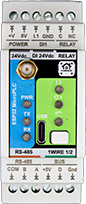
Product description
The HOMAMASTER MicroPLC is a compact and powerful open-source automation controller based on the ESP32-WROOM-32U. Designed for seamless integration with Home Assistant using ESPHome, it enables control of smart home devices, sensors, actuators, and industrial systems through RS-485 Modbus and wireless communication.
Maker: https://www.home-master.eu/
Product page: https://www.home-master.eu/shop/esp32-microplc-56 Schematics: https://github.com/isystemsautomation/homemaster-dev/tree/main/MicroPLC/Schematic
Features
- ESP32-WROOM-32U microcontroller with Wi-Fi and Bluetooth
- ESPHome compatible firmware for seamless Home Assistant integration
- RS-485 Modbus RTU interface for extension module communication
- USB Type-C port for programming, debugging, and power
- 1-Wire interface with ESD and overvoltage protection
- PCF8563 RTC for accurate time-based automation
- One industrial-grade relay with varistor and opto-isolation
- One 24V digital input with surge protection (ISO1212)
- Four front-panel buttons and status LEDs for local control and diagnostics
- DIN-rail mountable for standard electrical enclosures
Networking
Wi-Fi Connectivity – Integrated Wi-Fi for wireless access and Home Assistant integration.
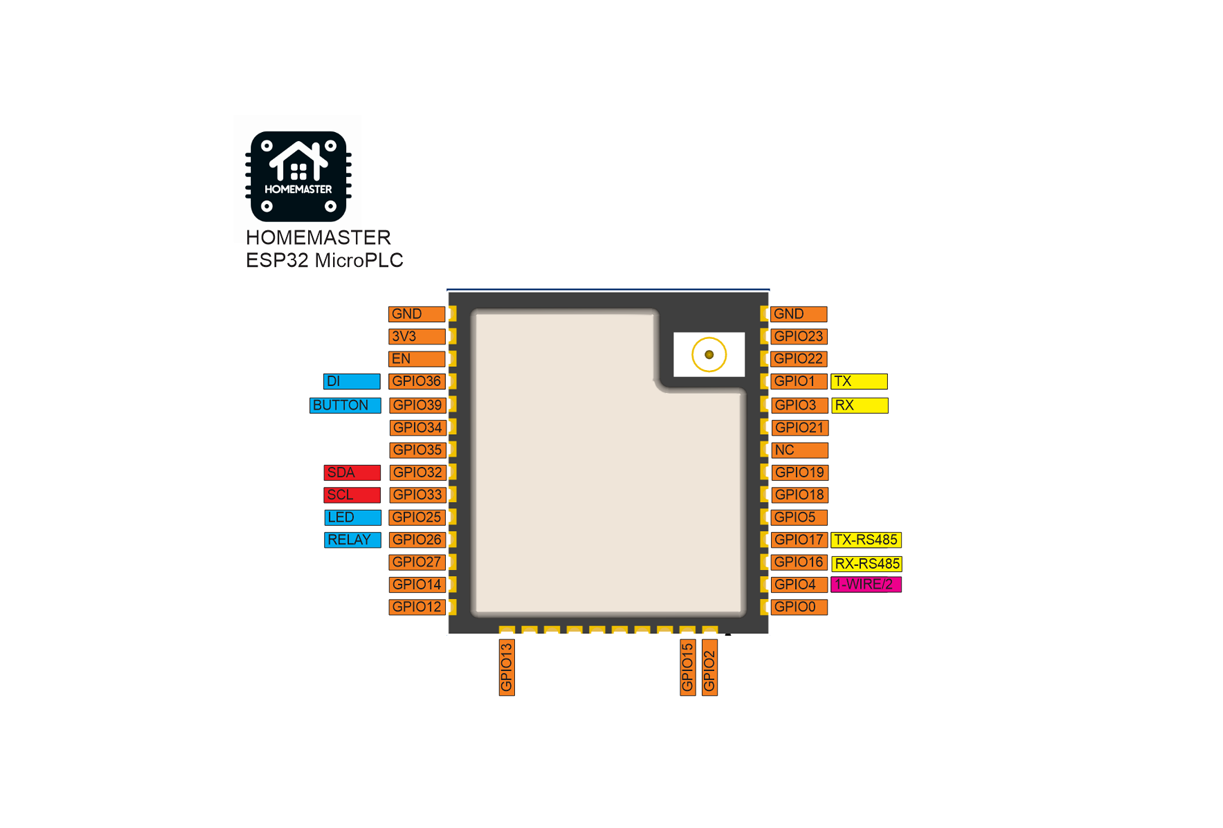
Pinout
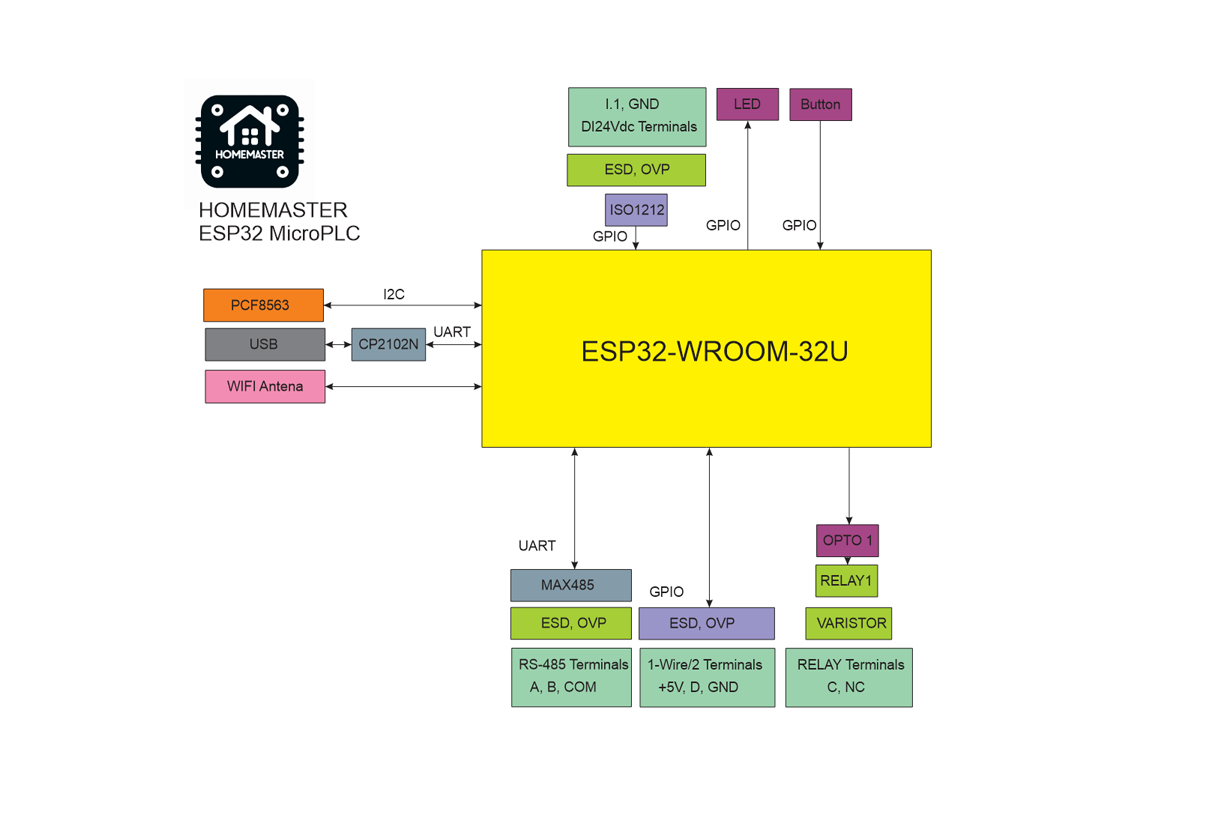
MicroPLC Functional Block Diagram
Programming
The MicroPLC comes with ESPHome pre-installed and can be confgured via:
Improve
Wi-Fi Configuration with Improv
- Power on your HomeMaster MicroPLC.
- Go to 👉 improv-wifi.com (works in Chrome/Edge on desktop or mobile).
- Connect via USB (Serial) or Bluetooth LE.
- Enter your Wi-Fi SSID and password, then press Connect.
- The device joins your Wi-Fi and is now ready.
You can then access it via its local address (e.g., http://homemaster-microplc.local) or directly in Home Assistant.
One-Click Import (ESPHome Dashboard Import)
Once connected to Wi-Fi, the MicroPLC will be automatically discovered in ESPHome Dashboard. When the device appears in ESPHome Dashboard, click “Take Control”. The MicroPLC supports dashboard import, automatically pulling its official configuration from GitHub
USB Type-C: Use the ESPHome Dashboard to upload the configuration
- Connect the MicroPLC to your computer with a USB Type-C cable.
- Download the YAML configuration file from our GitHub repository.(https://github.com/isystemsautomation/homemaster-dev/blob/main/MicroPLC/Firmware/microplc.yaml)
- Open the ESPHome Dashboard, import the YAML file, and update it with your Wi-Fi SSID and password.
- Flash the device directly from ESPHome Dashboard.
- The MicroPLC supports automatic reset and boot control — there is no need to press reset or boot buttons during programming.
- After flashing, the device will reboot automatically and run the updated firmware.
Bus system configuration
I2C
| PIN | |
|---|---|
| SDA | GPIO32 |
| SCL | GPIO33 |
I2C addresses
| address | |
|---|---|
| pcf8563 | 0x51 |
Specifications
| Feature | Details |
|---|---|
| Microcontroller | ESP32-WROOM-32U |
| Power Supply | 5V via USB-C for programming or 24V via terminal |
| Relay Output | 1x 16A (optically isolated) |
| Digital Input | 1x 24V DI (ISO1212-based) |
| Communication | RS-485, Wi-Fi, Bluetooth, USB-C |
| RTC | PCF8563 |
| 1-Wire | 1 channel (ESD/OVP protected) |
| Mounting | DIN-rail |
| Firmware | ESPHome (pre-installed), Arduino |
License
Licensing
This project uses a hybrid licensing model.
Hardware
Hardware designs (schematics, PCB layouts, BOMs) are licensed under: CERN-OHL-W v2
Firmware & ESPHome Integration
All firmware, ESPHome configurations, and software components are licensed under: MIT License
This ensures full compatibility with ESPHome and Home Assistant while protecting hardware designs.
See LICENSE files in each directory for full terms.
🔧 HOMEMASTER – Modular control. Custom logic.